Notes of my Lotus Notes Headline Animator

Search My Blog

Showing posts with label Attachments. Show all posts

Tuesday, August 2, 2016

Exporting/Logging e-mail details in some excel sheet from any Folder or Inbox

If you want all these details logged in some excel sheet

1.     Select the documents and go to File menu > select Export...

 2.     Select folder in which you want to save.
         Select Save as type as Comma separated value.
         Give some name, say, attachment_logs.csv.
         Then click on Export button.
 3.     It would bring another small dialogue box.
         If you want details of selected mails then select How Much to Export as 'Selected documents'.
         Otherwise you may select 'All documents'.
         Export Character Set keep as 'Default character set'.
         Check the Details to Incorporate as 'Include View titles'.
         Otherwise just with the data you may get confused.
         Especially if you are NOT a lotus notes developer, then you would get confused with the extra column values that get exported.

4.     Once the export is completed you would see the below message in the bottom pane of your mailbox.
        You may delete the extra columns that get populated in the .csv file and keep only those you need.

 The result would look somewhat like this:

Hope this helps!! :)

How to see how many attachments are there in each mail and what are the attachment names?

Follow the images and make changes in your Views > All Documents. Or you may make these changes in specific folders as well.
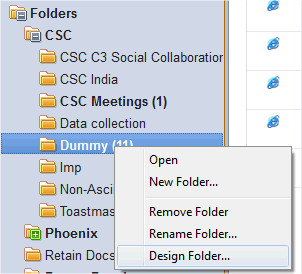
1.     Right-click in the folder/view where you have your mails (with or without attachments) and select Design Folder...

2.      Select the Who column as highlighted in the below snapshot.
And do right click - then select Insert New Column...

3.     A new blank column will be created.
        Double click on the column and below properties box will open.
        Give a name in the Title text box.
        Select Multi-value separator: as New Line.
        Then in the bottom pane it must be showing various options.
        Select Attachment Names.

4.     Similarly you can insert another new column in front of Attachment Names column and give a name, say Count.
        For this you set Multi-value separator as ‘None’ - which is the default option set.
        In the bottom pane you can select Attachments instead.
        This will give you number of attachments present in each mail.

5.     Ctrl+S to save the design changes of the folder/view.
        Then close the folder/view.
        Close your mailbox and re-open to see the changes.

The new design would look something like this:

Hope it helps!!

Extract all attachments from a folder without opening the file

Sub Click(Source As Button)
%REM
Created by Gayatri Gouda gayatrigouda@gmail.com on 24th Jan 2013
Please follow the comments in the code and you can customise the button to extract files
from a particular folder in your mailbox, to a particular path in your drive
%END REM

 On Error Goto errhandle


 'Declarations
 Dim session As New NotesSession
 Dim db As notesdatabase
 Dim view As NotesView
 Dim doc As NotesDocument

 Dim object As NotesEmbeddedObject

 Dim collection As NotesDocumentCollection
 Dim currentResponse As NotesDocument

 Dim tempDirectory, actualDir, ptempDirectory As String
 Dim nameAtt, result As Variant
 Dim numAtt, count, cnt, i, j, k, l, indx As Integer
 Dim flag As String
 Dim myNames() As String
 Dim mth As String, newDir As String, pnewDir As String
 Dim filename As String, fileName1 As String
 Dim edate As String

 'to allow users select the dialogue box
 Dim ws As New NotesUIWorkspace
 Dim dirpath As Variant
 Dim dirname As String

 Msgbox "If there are NO files in the folder in which you want the files to be extracted, then CREATE a New Text Document.txt file in it and then select that file in the File Open Dialogue box."

 dirpath = ws.OpenFileDialog( True,"Select any file from the folder in which you want the files to be extracted. NOTE: CREATE a New Text Document.txt file if there are no files in the folder.",, "C:\Users")
 If Not(Isempty(dirpath)) Then
  dirname = Strleftback(dirpath(0), "\") + "\"
  Print "Here's the folder path in which your files are saved: " + dirname
 Else
  Msgbox "No files are selected. Please select any file in the folder."
  Print "No files are selected. Please select any file in the folder."
  Goto theEnd
 End If


%REM
Mention the custom folder of your choice in tempDirectory folder.
Make sure you give \\ to separate the folder names in the path.
This path should already have been created manually by you.
%END REM
 tempDirectory = dirname

%REM
This is the one you see in the message box after the files are extracted.
Here the \\ is not needed. You can mention the path name as it is.
%END REM
 ptempDirectory = dirname

%REM
In case you want all your files to the path you have mentioned above then
find section MakeDIR  and comment it out with %rem and %endrem words
%END REM
 newDir = pnewDir = dirname


 Set db = session.CurrentDatabase

%REM
Set view = db.GetView("Data collection")
 ---- Date collection is the folder name.
Instead of the 'Data collection' folder name you can put some other folder name in " " quotes.
Make sure you put the exact folder name. Check if you have put any extra spaces.
%END REM

 Set view = db.GetView("Data collection")

 numAtt = count = cnt = 0

 Set doc = view.GetFirstDocument

 While Not (doc Is Nothing)

  result = Evaluate("@Attachments", doc)
  nameAtt = Evaluate("@AttachmentNames", doc)
  numAtt = result(0)

  If numAtt > 0 Then
   For i=0 To numAtt-1 Step 1
    If nameAtt(0) <> "" Then
     Set object = doc.GetAttachment( nameAtt( i ) )
     indx = 0     
     flag = "no"     
     For k = 1 To cnt Step 1      
      If nameAtt( i ) = myNames( k ) Then
       indx = indx + 1
       flag = "yes"
      End If
     Next
    
    
     If flag = "yes" Then
      REM This is how the new file is renamed: <Actual file name _ index . extension>
      filename = Strleftback(nameAtt(i), ".") + "_" + Cstr(indx) + "." + Strrightback(nameAtt(i), ".")
     Else
      filename = nameAtt( i )
     End If


%REM
'edate' is the date of the e-mail on which it is received
'mth' is set as <Month of the received date of e-mail><ddmmyyyy format of the received date of e-mail>
%END REM
    
%REM
'newDir' is programatically set as the Path you created manually \ monthddmmyyyy
  e.g.  C:\\Gayatri\AM\Data Collection Report\January28012013
'pnewDir' is for display purpose
%END REM    
    
%REM
Checking if the folder <Monthddmmyyyy> is already created.
If yes, then it will move to the section where the files are extracted.
If no, it will try to create the folder <Monthddmmyyyy> in the Path you have mentioned in 'tempDirectory' variable
%END REM  
    
'MakeDIR    
     REM START section MakeDIR    
    
     edate = doc.GetFirstItem("PostedDate").DateTimeValue.DateOnly
     mth = setMonth(Month(edate)) & Cstr(Format(edate, "ddmmyyyy"))
    
     newDir = tempDirectory & mth & "\\"
     pnewDir = ptempDirectory & mth & "\"
    
    
     fileName1 = Dir$(tempDirectory, 16)
    
     Do While fileName1$ <> ""
      fileName1$ = Dir$()
      If fileName1$ = mth Then Goto extrctFile
     Loop
    
     Mkdir newDir
     REM END section MakeDIR


extrctFile:
     REM this is where the extract happens.
     actualDir = newDir & filename
    
     Call object.ExtractFile(actualDir)
     count = count + 1
    
    End If
   Next
  End If

  If numAtt > 0 Then             
   Redim Preserve myNames(cnt+numAtt)
   For l = 1 To numAtt
    myNames(cnt + l) = nameAtt( l - 1  )
   Next
   cnt = cnt + numAtt
  End If

  Set doc = view.GetNextDocument (doc)

 Wend

 Msgbox "Total " &  count & " files are extracted to the path: " &  ptempDirectory
 Print "Total " &  count & " files are extracted to the path: " &  ptempDirectory


theEnd:
 Exit Sub

errhandle:
 Messagebox " Error line: " & Erl() & " error number : " & Err() & " description : " & Error$  & "."
 Goto theEnd
End Sub

Function setMonth(mth As Integer)  As String Dim mth1 As String

 Select Case mth
 Case 1 : mth1 = "January"
 Case 2 : mth1 = "February"
 Case 3 : mth1 = "March"
 Case 4 : mth1 = "April"
 Case 5 : mth1 = "May"
 Case 6 : mth1 = "June"
 Case 7 : mth1 = "July"
 Case 8 : mth1 = "August"
 Case 9 : mth1 = "September"
 Case 10 : mth1 = "October"
 Case 11 : mth1 = "November"
 Case 12 : mth1 = "December"
 Case Else    : mth1 = "Others"
 End Select
 setMonth = mth1
End Function

Friday, December 21, 2012

Extracting attachments from web application

Here's a code for extracting attachments/files from documents in LN web application:

Sub Initialize
        On Error Goto errhandle
        Dim session As New NotesSession
        Dim db As notesdatabase
        Dim view As NotesView
        Dim doc As NotesDocument
       
        Dim object As NotesEmbeddedObject
       
        Dim collection As NotesDocumentCollection
        Dim currentResponse As NotesDocument
       
        Dim tempDirectory, actualDir As String
        Dim nameAtt, result As Variant
        Dim numAtt, count As Integer
       
        tempDirectory="P:\\Gayatri\\Temp\\"
'       tempDirectory="O:\\CITC\\ECAS\\GRCE\\"
        Set db = session.CurrentDatabase
        Set view = db.GetView("KBByCategory1")
       
        numAtt = 0
        count=0
        cnt = 0
       
        Dim myNames() As String
       
        Set doc = view.GetFirstDocument
       
        While Not (doc Is Nothing)
               
                result = Evaluate("@Attachments", doc)
                nameAtt = Evaluate("@AttachmentNames", doc)
                numAtt = result(0)
               
                If numAtt > 0 Then
                        For i=0 To numAtt-1 Step 1
                                If nameAtt(0) <> "" Then
                                        Set object = doc.GetAttachment( nameAtt( i ) )
                                        indx = 0
                                        flag = "no"
                                        For k = 1 To cnt Step 1
                                                If nameAtt( i ) = myNames( k ) Then
                                                        indx = indx + 1
                                                        flag = "yes"
                                                End If
                                        Next
                                        If flag = "yes" Then
                                                filename = Left$(nameAtt( i ),Len(nameAtt( i ))-4) + "_" + indx +       Right$(nameAtt( i ), 4)                                                                                                                                        
                                        Else
                                                filename = nameAtt( i )
                                        End If
                                       
                                        actualDir = tempDirectory & filename
                                        Call object.ExtractFile(actualDir)
                                        count = count + 1
                                       
                                End If
                        Next
                End If
               
                If numAtt > 0 Then             
                        Redim Preserve myNames(cnt+numAtt)
                        For j = 1 To numAtt
                                myNames(cnt + j) = nameAtt( j - 1  )
                        Next
                        cnt = cnt + numAtt
                End If
               
                '------------------------------- Response ------------------
                Set collection = doc.Responses
                Set currentResponse = collection.GetFirstDocument
               
                While Not ( currentResponse Is Nothing )
                       
                        result = Evaluate("@Attachments", currentResponse)
                        nameAtt = Evaluate("@AttachmentNames", currentResponse)
                        numAtt = result(0)
                       
                        If numAtt > 0 Then
                                For i=0 To numAtt-1 Step 1
                                        If nameAtt(0) <> "" Then
                                               
                                                Set object = currentResponse.GetAttachment( nameAtt( i ) )
                                                indx = 0
                                                flag = "no"
                                                For k = 1 To cnt Step 1
                                                        If nameAtt( i ) = myNames( k ) Then
                                                                indx = indx + 1
                                                                flag = "yes"
                                                        End If
                                                Next
                                                If flag = "yes" Then
                                                        filename = Left$(nameAtt( i ),Len(nameAtt( i ))-4) + "_" + indx +       Right$(nameAtt( i ), 4)                                                                                                                                        
                                                Else
                                                        filename = nameAtt( i )
                                                End If
                                               
                                                actualDir = tempDirectory & "Responses\\" & filename
                                                Call object.ExtractFile(actualDir)
                                                count = count + 1                              
                                        End If
                                Next
                        End If
                       
                        If numAtt > 0 Then
                                Redim Preserve myNames(cnt+numAtt)
                                For j = 1 To numAtt
                                        myNames(cnt + j) = nameAtt( j - 1  )
                                Next
                                cnt = cnt + numAtt
                        End If
                       
                        Set currentResponse = collection.GetNextDocument( currentResponse )
                       
                Wend
               
                Set doc = view.GetNextDocument (doc)
               
        Wend
        Msgbox cnt
        For i = 1 To 21 Step 1
                Msgbox myNames(i)
        Next
        Msgbox count
        Exit Sub
errhandle:
        Messagebox " Error line: " & Erl() & " error : " & Err() & " err() : " & Err()
End Sub